Creating Reliable Agents in August


Share on:
An agent in August automates one piece of repeatable legal work: it runs a defined input through an ordered set of instructed steps and produces a defined output. This guide covers how to plan, build, test, and troubleshoot an agent so it produces consistent, reliable results.
Agent outputs assist your team's work; they do not replace review by a supervising lawyer. Some features described here, including which trigger types are available, may vary depending on your firm's account configuration.
Download full PDF: Here
1. How an Agent Is Built
Every agent has the same anatomy: a top-level instruction describing what it should produce, an ordered sequence of steps, defined inputs the agent needs to run, and a final output. |
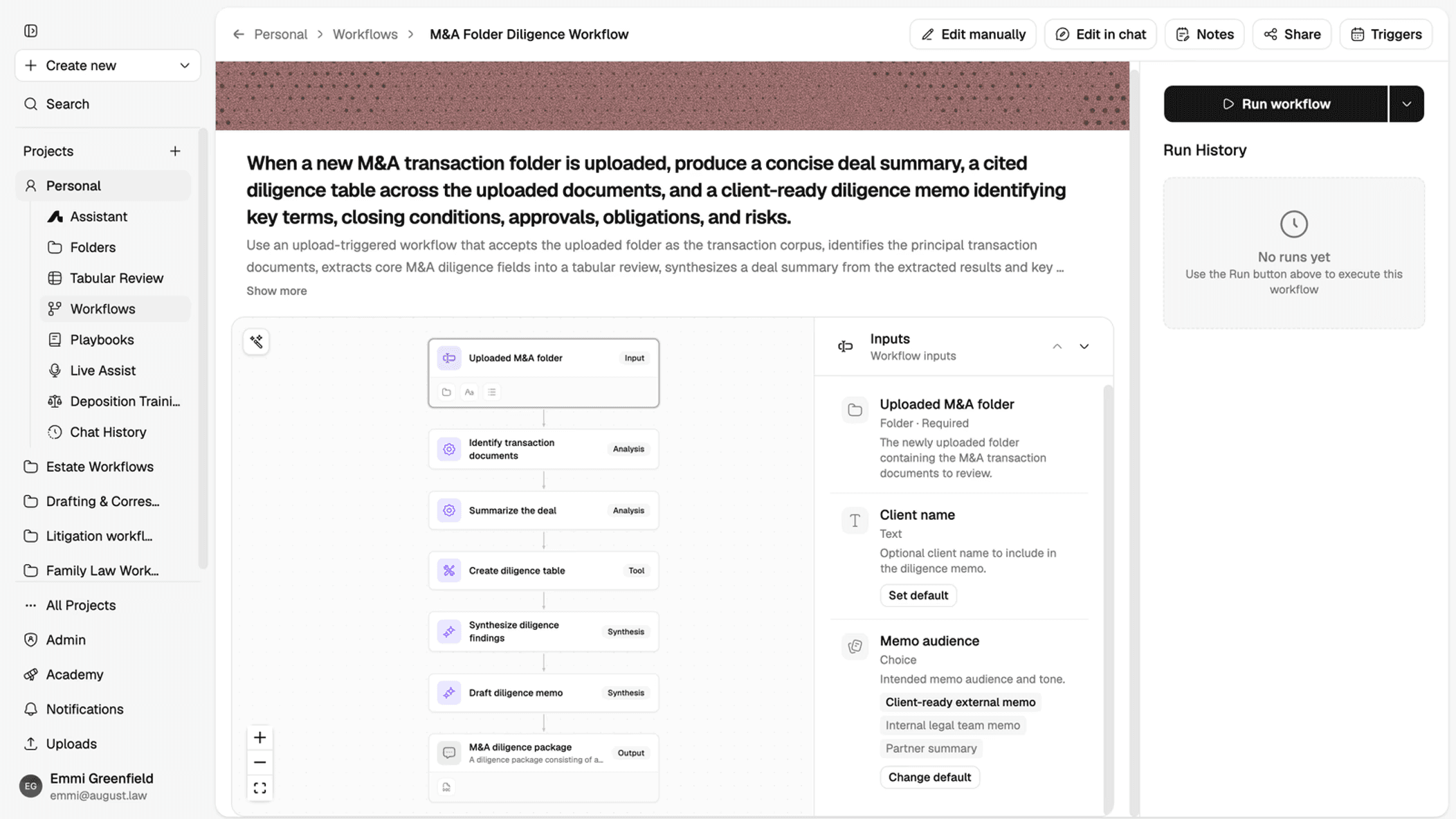
An agent’s canvas: a folder upload feeds an ordered sequence of steps, producing a diligence package as output. The Inputs panel (right) lists what the agent needs before it runs; Run Agent and Run History are used for testing, covered in Section 6.
Each step is one of a few types, labeled on the canvas: Analysis (read and reason over the inputs), Tool (a discrete task, such as building a table), or Synthesis (write or combine results into a draft). Build the smallest complete version of an agent first, one outcome, one input set, one output, before adding branches or additional steps.
An agent can be edited two ways: Edit manually, clicking into each step to change it directly, or Edit in chat, describing the change you want in plain language and letting the change apply across the relevant steps. Edit in chat is often faster for adjusting instructions or wording across an agent without opening every step individually.
2. Plan Before You Build
Before opening the builder, define six things:
Outcome. State the single result the agent should produce. Don't combine unrelated tasks into one agent.
Trigger. Decide what starts the work: an upload, an email, or a schedule.
Inputs. List every document, field, date range, jurisdiction, template, or playbook the agent needs.
Judgment points. Mark where a lawyer's approval, a judgment call, or missing information should stop the agent for review.
Steps. Break the work into ordered, single-purpose actions. Add a branch only when the next action or output is genuinely different, not for every possible variation.
Output. Specify the format, required fields, naming, and destination of the final deliverable.
An agent that is planned this way before you open the builder needs far less rework once it's built.
3. Choosing and Configuring a Trigger
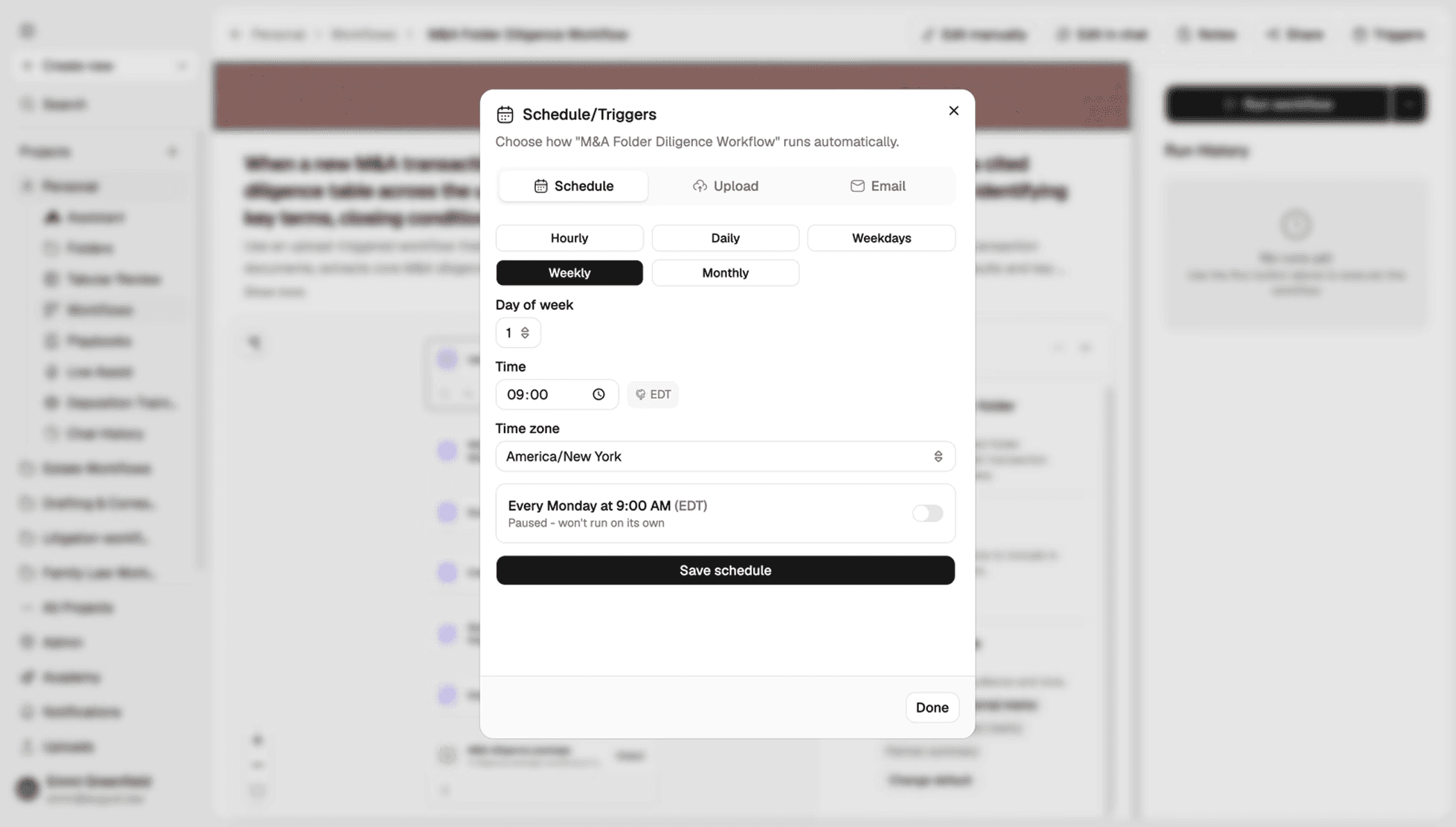
The Schedule/Triggers panel. August supports three trigger types: Upload (a new file or folder starts the agent), Email (a qualifying message starts it), and Schedule (a recurring time starts it, with control over day, time, and time zone).
When setting a schedule, confirm the time zone explicitly, it is set independently of your device or browser, and a mismatch is the most common reason a scheduled agent runs at an unexpected time. A saved schedule can also be paused without deleting it, which is useful while an agent is still being tested.
For upload or email triggers, define the qualifying event as narrowly as possible: a specific folder, sender, or subject line, rather than any file or any email, so the agent does not fire on the wrong material.
4. Writing Instructions That Work
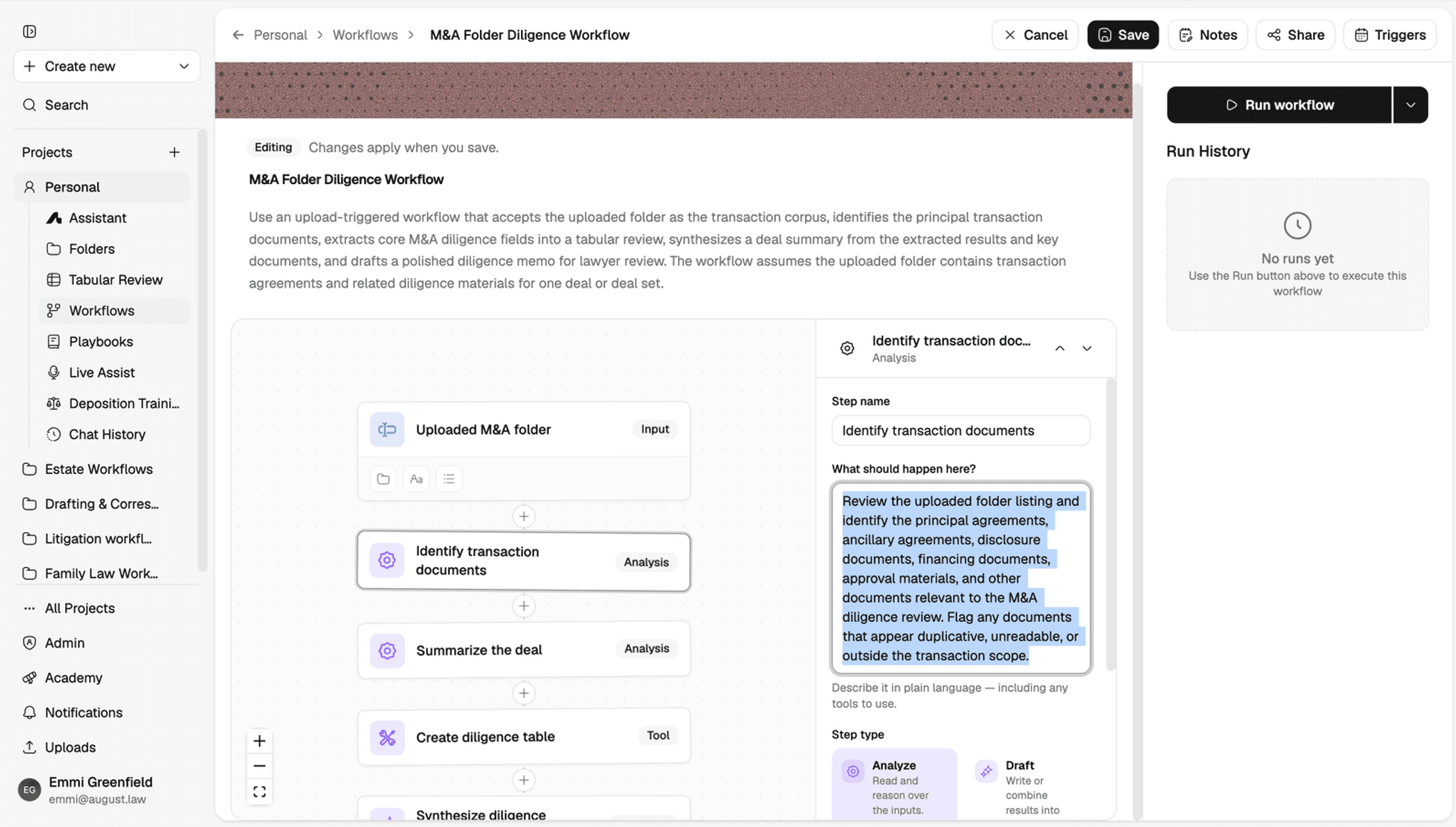
A step's “What should happen here?” field, where instructions are written in plain language. Each step also has a Step Type (Analyze, Draft, and others) that governs how it processes its inputs.
The single biggest factor in output quality is how specific the instructions are. Vague instructions produce vague, inconsistent output; specific instructions produce consistent, reviewable output. The same task, written both ways:
Contract review
Weak: “Review this contract and flag issues.”
Improved: For an in-house counsel audience, review the uploaded NDA against the approved NDA playbook. Limit the review to confidentiality, permitted use, term, return/destruction, remedies, governing law, and assignment. Produce a table with clause, playbook position,
variance, risk level, and proposed revision. Escalate missing governing-law terms or any clause the playbook does not address.
Document summary
Weak: “Summarize this document.”
Improved: Prepare a one-page summary for the matter team. Identify the parties, effective date, term, renewal, termination rights, payment obligations, notice details, governing law, and key deadlines. Cite the section or page for each item. Label anything not stated as “Not stated” rather than inferring it. End with a short list of items requiring lawyer review.
Client intake
Weak: “Check this intake.”
Improved: Assess the submitted intake for completeness against the required fields: client name, adverse parties, matter type, jurisdiction, key dates, responsible lawyer, contact details, and conflicts-search terms. Return a checklist grouped as Complete, Missing, and Needs Clarification. Route any conflicts match or uncertain identity to the designated conflicts reviewer rather than resolving it.
Recurring legal update
Weak: “Send a weekly legal update.”
Improved: Prepare a weekly digest for the employment-law team covering material developments in the relevant jurisdiction published in the past seven days. Include the authority, publication date, a short impact summary, affected practices, and a citation or source link. Exclude duplicates and anything outside the date range. Flag uncertain authority status for lawyer review before distribution.
5. Defining the Output
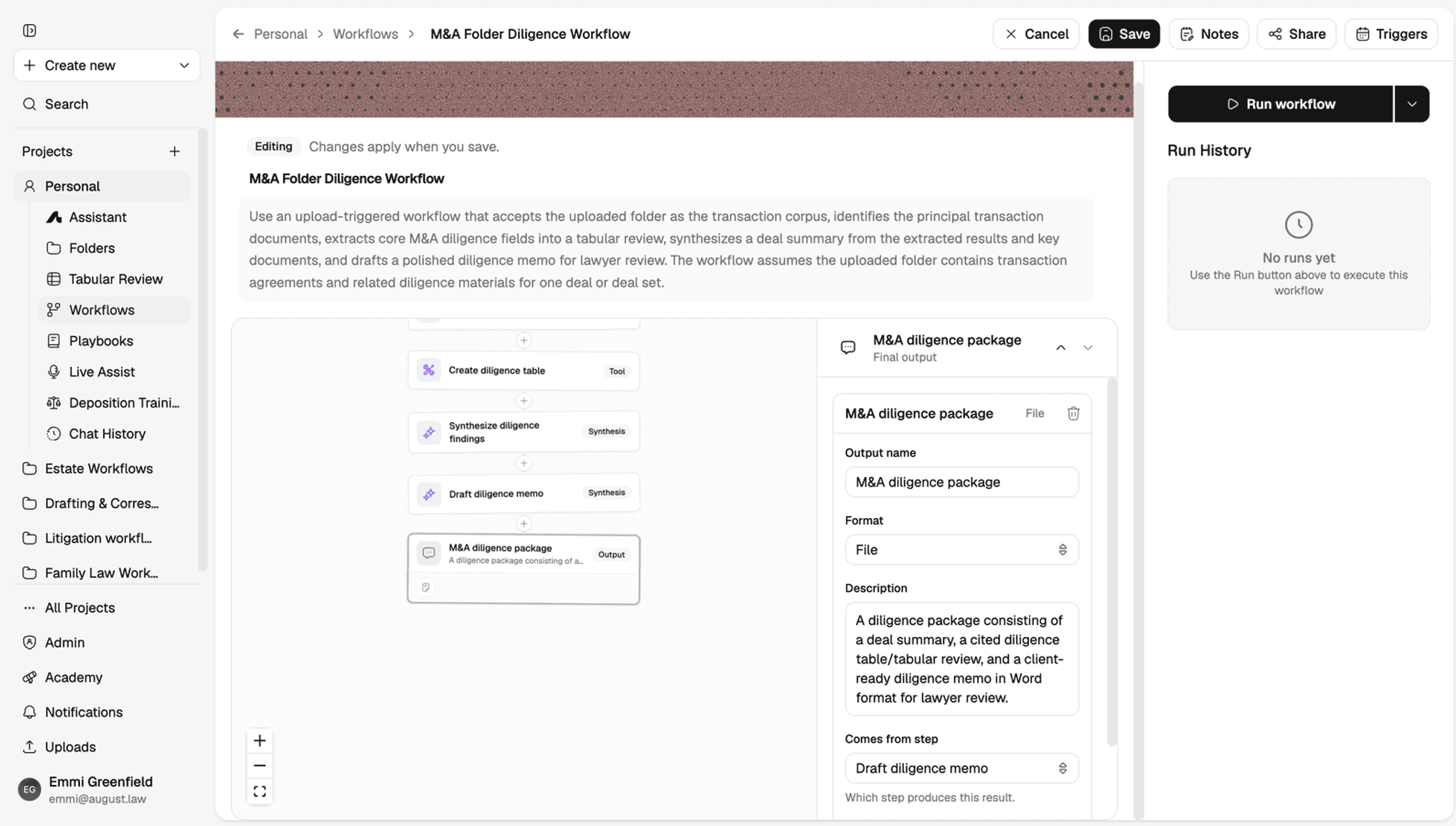
An output step's configuration: a Format field (File, Text, and others), a Description of exactly what the final deliverable should contain, and a “Comes from step” field wiring the output to the step that produces it.
Write the output description with the same specificity as a step's instructions: name the exact sections, fields, or format the final file should have, not just its general purpose. This is what determines whether a lawyer receives a document that is ready to review or one that needs reformatting first.
6. Testing Before Wider Use
Test a workflow the same way you'd pilot any new process before relying on it broadly, and keep a simple record for your own files.
Use a representative, non-sensitive test file. Choose material that resembles ordinary work without unnecessary client-confidential content.
Test the ordinary path and every branch. Run a separate scenario for each condition and confirm each one follows the intended path.
Confirm permissions. Verify every folder, document, playbook, template, and destination the agent needs is accessible.
Verify output details. Check names, dates, citations, section references, required fields, and formatting.
Confirm missing-input behavior. Remove one required input at a time. The agent should stop or flag the gap, not invent a value.
Retest after changes. Repeat the affected scenarios after any change to instructions, steps, or triggers.
Sample test log
Test date | Scenario / Branch | Input Used | Expected Result | Active Result / Reviewer |
|---|---|---|---|---|
BEFORE LIVE USE: |
7. Troubleshooting Common Issues
Issue | Likely Cause | Recommended Fix |
|---|---|---|
Agent will not run | Trigger is unavailable or too narrow, or a required input can't be accessed. | Confirm the trigger is available for your account, verify the qualifying event and required access, save the reviewed draft, and test again. |
Wrong or incomplete output | Instructions omit scope, fields, limits, or escalation rules. | Rewrite instructions to define audience, required fields, jurisdiction or date limits, output format, approved sources, and what to do when information is missing. |
Cannot find a file, folder, or playbook | The resource moved, was renamed, or is not accessible. | Confirm the current resource and access, use a stable and specific reference, and retest with the same source context intended for use. |
Branch behaves unexpectedly | Conditions overlap or use ambiguous terms, or were not tested separately. | Make branches mutually clear, remove unnecessary conditions, and run one test scenario per branch and boundary case. |
Duplicate or inconsistent outputs | More than one qualifying event starts the work, or steps repeat the same task with different instructions. | Narrow the trigger, remove duplicate steps, standardize naming and output requirements, and test repeated events. |
Scheduled agent runs at the wrong time | Time zone, recurrence, or effective date differs from what was intended. | Confirm the time zone and recurrence, record the expected next run, and monitor the next test run. |
Email trigger captures the wrong messages | The qualifying sender, subject, or attachment criteria are too broad. | Define the qualifying message more narrowly, test both matching and non-matching examples, and add review before any sensitive downstream action. |
Output needs too much cleanup | Format, field order, or naming requirements were not made explicit. | Provide a required structure or approved template, define exact fields and naming, and test against the final delivery format. |
When troubleshooting, change one variable at a time and compare the actual result against what you expected before making a second change.
8. Four Patterns to Start With
Each begins with a narrow scope, an approved source of truth, and an explicit human checkpoint.
1. NDA review against an approved playbook
Trigger / Inputs | Upload — NDA, approved playbook, matter context |
Steps | Extract key clauses → compare with playbook → identify variances → prepare issues table |
Human checkpoint | Lawyer reviews non-standard terms, risk levels, and proposed revisions |
Output | Issues table or review memo with clause references |
2. Weekly legal-update digest
Trigger / Inputs | Schedule — Jurisdiction, date range, approved sources, audience |
Steps | Collect in-range items → remove duplicates → summarize impact → organize by topic |
Human checkpoint | Lawyer validates authorities, urgency, and distribution list |
Output | Dated digest with citations or source links |
3. Client-intake completeness check
Trigger / Inputs | Upload or intake submission — Required-field list, submitted form, conflicts-search terms |
Steps | Check required fields → group gaps → identify ambiguous entries → prepare follow-up list |
Human checkpoint | Responsible lawyer or conflicts reviewer handles matches and judgment calls |
Output | Completeness checklist and clarification request |
4. Matter-folder document summary
Trigger / Inputs | Upload or folder event — Defined documents, matter context, summary fields, date range |
Steps | Identify documents → extract required facts → cite locations → consolidate deadlines and open items |
Human checkpoint | Matter lawyer verifies scope, dates, citations, and material omissions |
Output | Matter summary with source references and review flags |
9. Before You Launch
Confirm each of the following before an agent is used on live matters:
Outcome and final deliverable are defined, and an owner is assigned.
The trigger is narrow and confirmed available for your account.
Required inputs, source access, and missing-input behavior are confirmed.
Every branch and human checkpoint is documented and tested.
A supervising lawyer has approved substantive output from representative tests.
Access to client-confidential data is limited to what the agent needs.
No privileged or confidential information is placed directly in instructions unless required and appropriately controlled.
The agent is reviewed periodically, and any change is retested before the agent is used again.
The complete draft has been reviewed and saved. An agent is not available for use until this step is done.
Need a starting template?
If your firm needs generic subject-matter agents (estate, litigation, drafting and correspondence, etc), and you'd rather start from an existing template than build from scratch, email help@august.law. We maintain a library of preexisting templates for these areas and are happy to send examples over.
WHEN REQUESTING SUPPORT Include the agent name, expected versus actual behavior, approximate run time, the input used, and a screenshot of the issue if available. Avoid sending confidential or privileged material through unsecured channels. |